

.webp)
We’ve all been there: you spend an evening curating the perfect mix of pieces on a brand’s website, come back a few days later…and your cart is mysteriously empty. Whatever magic combination of lamps, nightstands, and velvet dining chairs you had going? Gone.
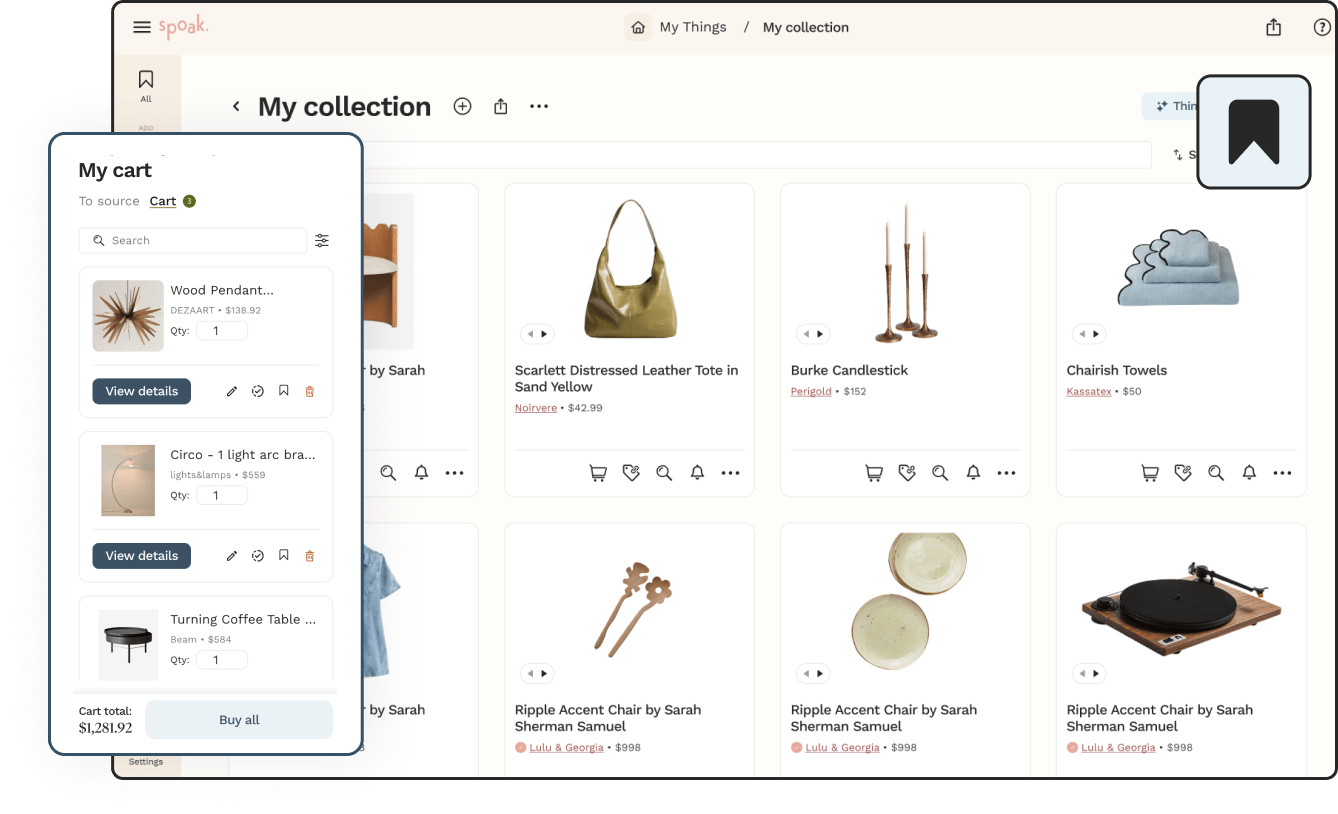
Global Cart is our answer to that very specific heartbreak. It’s a single, always-there cart inside Spoak where you can save products from anywhere you’re shopping—across brands, sessions, and tabs—and come back to them on your own timeline. No digging through browser history, no “what was that side table called again?” energy. Just one clean, visual list of everything you’re noodling on.


Global Cart keeps track of what you’re thinking about buying, so you can focus on the design decisions instead of re-finding links. When you’re logged into Spoak, you’ll see a small cart icon in the top-right corner of your screen. The badge on the icon shows how many items you’ve saved so far; click it anytime to see your full list.
Inside your Global Cart, you can:
All of this lives behind a single, familiar icon, so Global Cart adds power to your shopping flow without adding extra menus to learn.
Shopping for a room rarely happens in one clean, linear pass. You might:
We built Global Cart so Spoak can be the place where all of those almost-purchases stay put until you decide what’s in and what’s out. Instead of relying on each individual store’s cart (or your 47 open tabs), you get a calm, central spot for your future buys that’s integrated into the design tools you already use.
And because we care a lot about keeping Spoak approachable, we wrapped that functionality into a flow you already know: click the little cart icon when you like something, and it’s safe. That’s it.
Global Cart and Super Shop are basically best friends.
When you’re in Source / Super Shop, browsing products from across the internet in one place, you’ll see a cart icon on each product. Click it, and that product is instantly added to your Global Cart—no extra configuration or setup.
Our Chrome extension already lets you scoop up products from almost any site on the internet into Spoak. With Global Cart in the mix, that experience becomes even more cohesive: when you use the extension to save a product, it’s added to your Spoak account and you can opt to add it to your Global Cart alongside everything else you’ve been eyeing.
That means:
…all live together with the pieces you discovered in Super Shop, accessible from the same simple cart icon at the top of Spoak. You don’t have to remember where you found something to get back to it—Global Cart remembers for you.
You can find step-by-step screenshots in the help guide, but here’s the basic flow:
We handle the organizing and remembering behind the scenes; you just tap the same few buttons you’re used to.
For a detailed walkthrough with screenshots and tips, check out our Global Cart help guide: https://help.spoak.com/article/362-global-cart

We’ve all been there: you spend an evening curating the perfect mix of pieces on a brand’s website, come back a few days later…and your cart is mysteriously empty. Whatever magic combination of lamps, nightstands, and velvet dining chairs you had going? Gone.
Global Cart is our answer to that very specific heartbreak. It’s a single, always-there cart inside Spoak where you can save products from anywhere you’re shopping—across brands, sessions, and tabs—and come back to them on your own timeline. No digging through browser history, no “what was that side table called again?” energy. Just one clean, visual list of everything you’re noodling on.
Global Cart keeps track of what you’re thinking about buying, so you can focus on the design decisions instead of re-finding links. When you’re logged into Spoak, you’ll see a small cart icon in the top-right corner of your screen. The badge on the icon shows how many items you’ve saved so far; click it anytime to see your full list.
Inside your Global Cart, you can:
All of this lives behind a single, familiar icon, so Global Cart adds power to your shopping flow without adding extra menus to learn.
Shopping for a room rarely happens in one clean, linear pass. You might:
We built Global Cart so Spoak can be the place where all of those almost-purchases stay put until you decide what’s in and what’s out. Instead of relying on each individual store’s cart (or your 47 open tabs), you get a calm, central spot for your future buys that’s integrated into the design tools you already use.
And because we care a lot about keeping Spoak approachable, we wrapped that functionality into a flow you already know: click the little cart icon when you like something, and it’s safe. That’s it.
Global Cart and Super Shop are basically best friends.
When you’re in Source / Super Shop, browsing products from across the internet in one place, you’ll see a cart icon on each product. Click it, and that product is instantly added to your Global Cart—no extra configuration or setup.
Our Chrome extension already lets you scoop up products from almost any site on the internet into Spoak. With Global Cart in the mix, that experience becomes even more cohesive: when you use the extension to save a product, it’s added to your Spoak account and you can opt to add it to your Global Cart alongside everything else you’ve been eyeing.
That means:
…all live together with the pieces you discovered in Super Shop, accessible from the same simple cart icon at the top of Spoak. You don’t have to remember where you found something to get back to it—Global Cart remembers for you.
You can find step-by-step screenshots in the help guide, but here’s the basic flow:
We handle the organizing and remembering behind the scenes; you just tap the same few buttons you’re used to.
For a detailed walkthrough with screenshots and tips, check out our Global Cart help guide: https://help.spoak.com/article/362-global-cart
We are an online interior design studio for enthusiasts and professionals. Get a real-world design education, easy-to-use tools, job opportunities, and a tight-knit community. All levels welcome.
Join now


