

.webp)
If you’ve ever been deep into a floor plan or elevation and thought, “I just need this one oddly specific thing,” you’re exactly who we built Magic Asset for.
Spoak’s stock asset gallery covers a lot—from standard sofas and sinks to statement lighting and architectural details. But real homes are full of one-off finds, custom builds, and “I saw this once on Pinterest and can’t stop thinking about it” ideas. No gallery, no matter how big, can realistically hold everything you dream up.
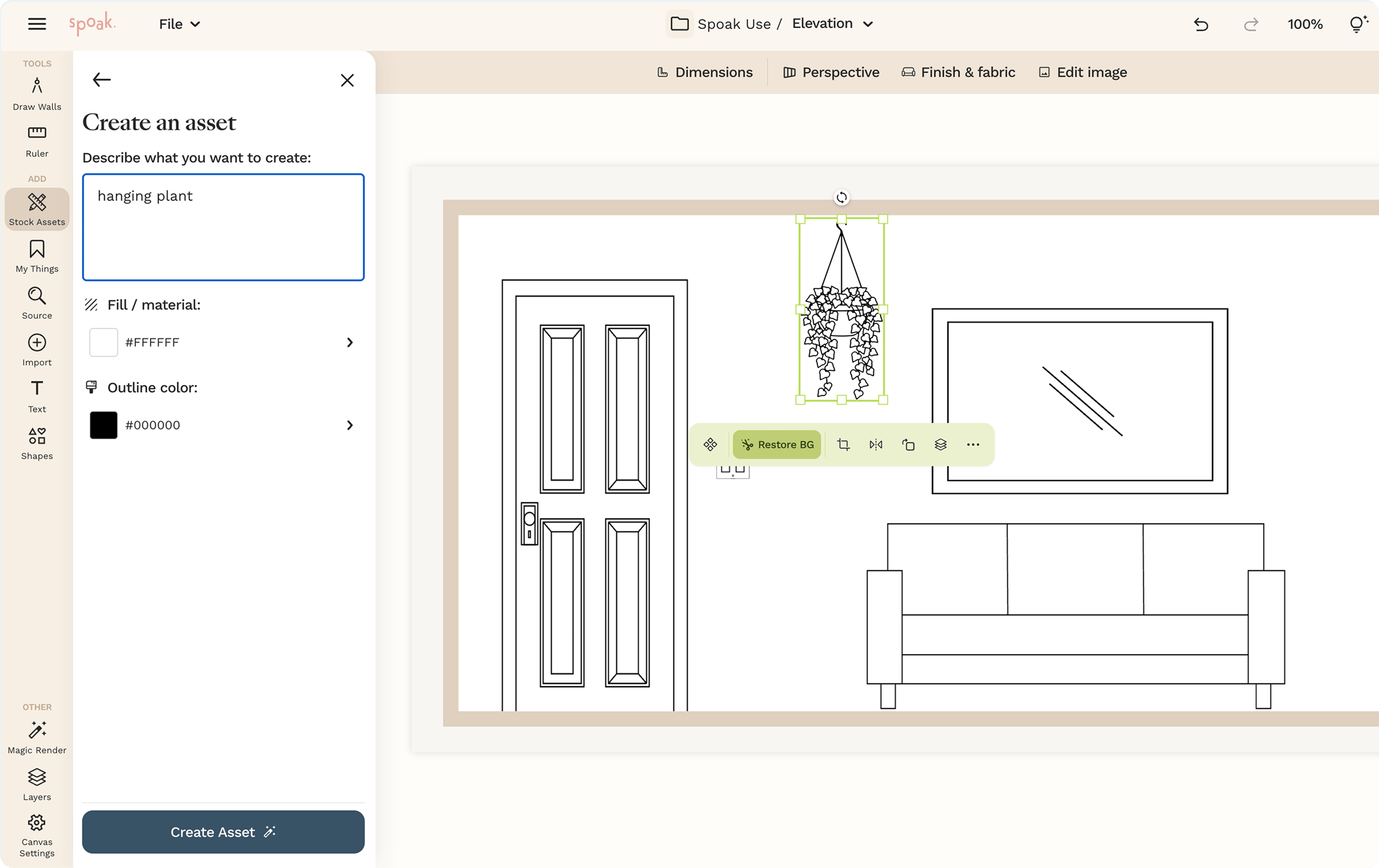
Magic Asset for floor plans and elevations closes that gap. Instead of requesting new assets and waiting for them to be created, you can now generate custom, to-scale floor plan and elevation assets in seconds—right inside Spoak, using the same simple tools you already know.


Magic Asset gives you a fast, approachable way to turn your ideas into linework and symbols that fit seamlessly into your existing projects. With it, you can:
Think of it as a tiny, on-call asset designer living inside your floor plan and elevation tools—doing the complex stuff for you while your interface stays clean and straightforward.
Designers (and design-obsessed people) are endlessly inventive. One week you’re drafting a simple bedroom layout; the next you’re mapping out a custom built-in around a weirdly placed window, or diagramming a dream mudroom with eight different storage zones.
We’ve long offered a robust asset gallery and the ability to request additions when you needed something new. Those requests helped shape what the library looks like today. But creativity doesn’t always follow a schedule, and we wanted you to be able to capture those niche, personal, or highly specific elements in the moment—without breaking your flow or learning a whole new technical tool.
Magic Asset is our answer: a way to keep expanding what’s possible in Spoak without piling on complexity. You still sketch, drag, and drop the way you’re used to. There’s just one new, very capable button ready to help whenever the exact asset you need doesn’t exist yet.
You can find full step-by-step instructions in our help guide, but at a high level, using Magic Asset looks like this:
All the heavy lifting happens behind the scenes so you can stay focused on the fun part: making your plans and elevations accurately reflect what’s in your head (or on your mood board).
Need a place to start? Here are a few ways to put Magic Asset to work in your next project:
As with everything in Spoak, the goal is to make it feel natural to experiment—add an asset, swap it for a variation, undo, redo, and keep going until the space feels exactly right.
Magic Asset for floor plans and elevations is one more step toward a world where you don’t have to choose between powerful tools and an inviting, easy-to-use workspace. You bring the ideas; Spoak quietly handles more and more of the technical details so you can stay in a creative headspace.
We’re excited to see how you use Magic Asset to document custom millwork, dream projects, speculative layouts, and the “someday” renovations you’re planning for yourself and your clients. If it helps you design something you’ve never been able to fully draw before, we’d love to see it.
Full how-to and step-by-step guide: https://help.spoak.com/article/377-magic-asset-create

If you’ve ever been deep into a floor plan or elevation and thought, “I just need this one oddly specific thing,” you’re exactly who we built Magic Asset for.
Spoak’s stock asset gallery covers a lot—from standard sofas and sinks to statement lighting and architectural details. But real homes are full of one-off finds, custom builds, and “I saw this once on Pinterest and can’t stop thinking about it” ideas. No gallery, no matter how big, can realistically hold everything you dream up.
Magic Asset for floor plans and elevations closes that gap. Instead of requesting new assets and waiting for them to be created, you can now generate custom, to-scale floor plan and elevation assets in seconds—right inside Spoak, using the same simple tools you already know.
Magic Asset gives you a fast, approachable way to turn your ideas into linework and symbols that fit seamlessly into your existing projects. With it, you can:
Think of it as a tiny, on-call asset designer living inside your floor plan and elevation tools—doing the complex stuff for you while your interface stays clean and straightforward.
Designers (and design-obsessed people) are endlessly inventive. One week you’re drafting a simple bedroom layout; the next you’re mapping out a custom built-in around a weirdly placed window, or diagramming a dream mudroom with eight different storage zones.
We’ve long offered a robust asset gallery and the ability to request additions when you needed something new. Those requests helped shape what the library looks like today. But creativity doesn’t always follow a schedule, and we wanted you to be able to capture those niche, personal, or highly specific elements in the moment—without breaking your flow or learning a whole new technical tool.
Magic Asset is our answer: a way to keep expanding what’s possible in Spoak without piling on complexity. You still sketch, drag, and drop the way you’re used to. There’s just one new, very capable button ready to help whenever the exact asset you need doesn’t exist yet.
You can find full step-by-step instructions in our help guide, but at a high level, using Magic Asset looks like this:
All the heavy lifting happens behind the scenes so you can stay focused on the fun part: making your plans and elevations accurately reflect what’s in your head (or on your mood board).
Need a place to start? Here are a few ways to put Magic Asset to work in your next project:
As with everything in Spoak, the goal is to make it feel natural to experiment—add an asset, swap it for a variation, undo, redo, and keep going until the space feels exactly right.
Magic Asset for floor plans and elevations is one more step toward a world where you don’t have to choose between powerful tools and an inviting, easy-to-use workspace. You bring the ideas; Spoak quietly handles more and more of the technical details so you can stay in a creative headspace.
We’re excited to see how you use Magic Asset to document custom millwork, dream projects, speculative layouts, and the “someday” renovations you’re planning for yourself and your clients. If it helps you design something you’ve never been able to fully draw before, we’d love to see it.
Full how-to and step-by-step guide: https://help.spoak.com/article/377-magic-asset-create
We are an online interior design studio for enthusiasts and professionals. Get a real-world design education, easy-to-use tools, job opportunities, and a tight-knit community. All levels welcome.
Join now


