

.webp)
If you’ve ever tried to tuck a chair against a wall, swivel a sofa, or angle a floor lamp just so in a Spoak design, you’ve probably hit the same wall (pun intended): unless the product image was already angled exactly how you wanted it, it was nearly impossible to turn in a realistic way. The result? Designs that sometimes looked more like Dalí paintings than the fully styled rooms in your head.
Magic Angle is here to change that.
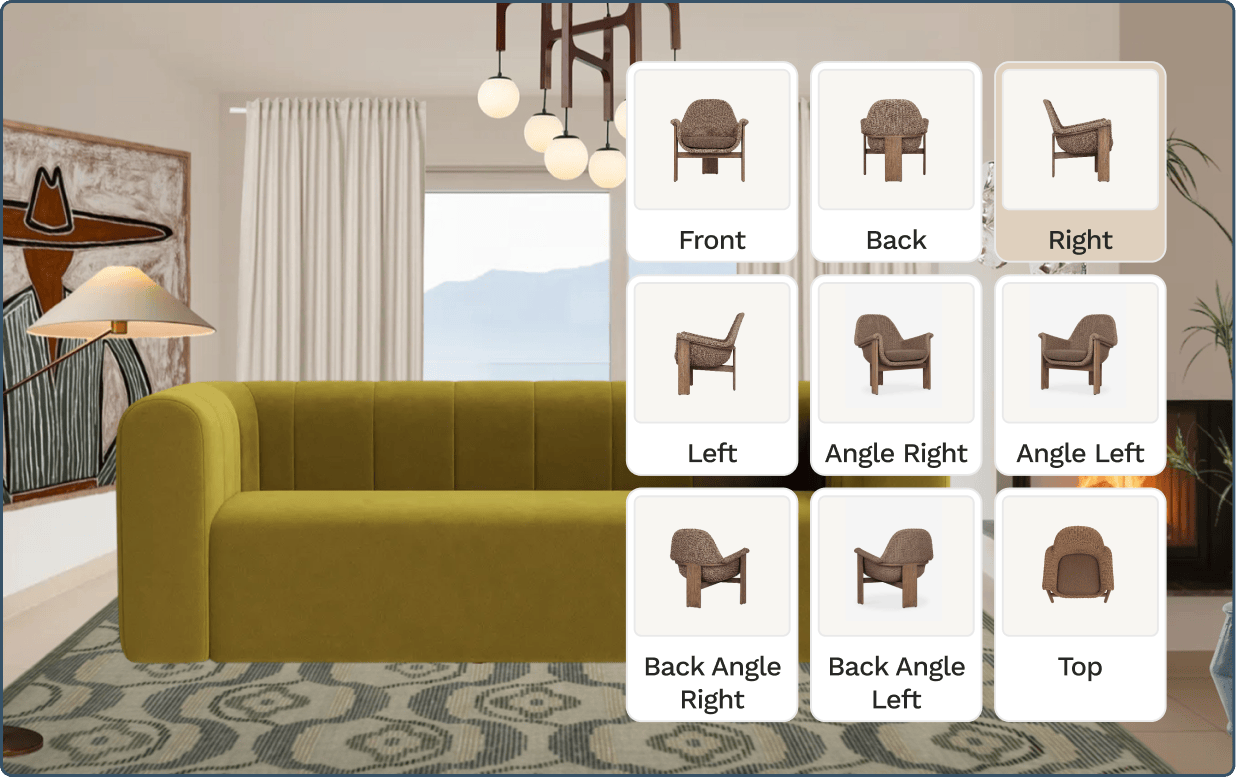
This new feature lets you angle any product on your canvas in any direction, and Spoak will automatically keep the perspective and proportions perfectly realistic—like you rotated it in 3D, minus the learning curve of a 3D program. It’s still our same approachable, playful design toolset, just with a lot more dimension.


Magic Angle allows you to do things like:
When you use Magic Angle, Spoak automatically keeps perspective accurate (no weird stretching or skewed legs), proportions intact and lines straight where they should be.
It’s the same rendering magic you’re used to in Spoak—realistic visuals of your designs, created with products you can actually buy—now with more control over how pieces sit in the design.
Think of it as a tiny 3D engine, hiding behind a very simple control.
So many of the design moments that make a room feel “right” come down to how furniture interacts with the architecture: a lounge chair turned slightly toward a fireplace; a dining chair pulled out from the table at an angle; a console gently skewed along a wall near an entry; a pair of armchairs flanking a coffee table.
Up until now, those moments were harder (or impossible) to express in Spoak, because we were limited by whatever product imagery the brand provided. We’ve wanted to find a way to work around that limitation for years, because our job is to give you tools that bring your exact vision to life. Magic Angle gives you that missing layer of realism so your designs can now show exactly what you’re dreaming up in your head, from true seating arrangements to realistic traffic flow, and ultimately, a perfect photorealistic end result.
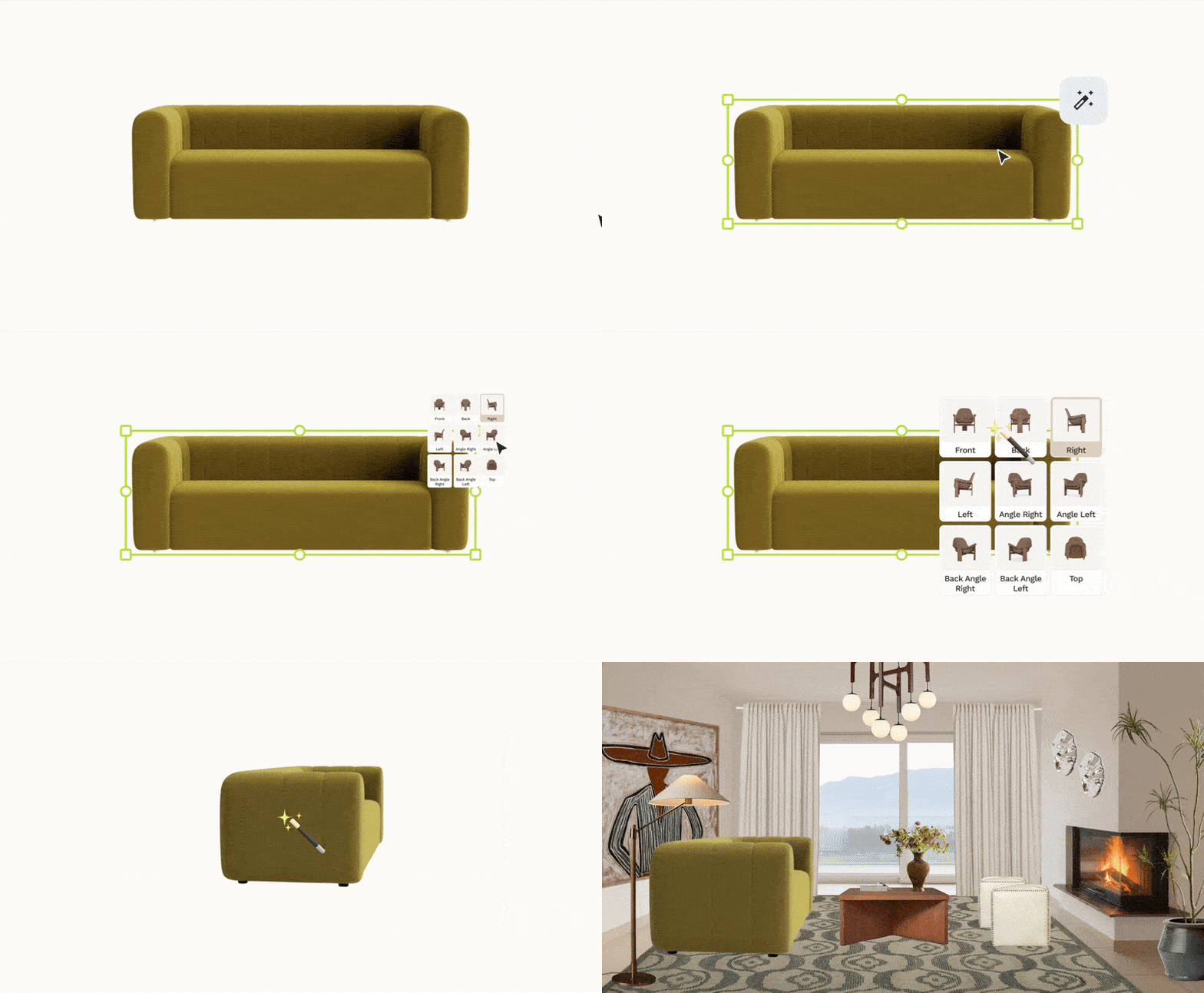
You can find full step-by-step instructions in our help guide, but here’s the gist:
Spoak handles all the math under the hood so the final result looks like a realistic product shot that just happened to face the exact direction you wanted.
If you want a few starter ideas, play around with:
Like everything else in Spoak, the idea is to test, tweak, undo, and play until the room feels like the version you’ve been picturing.
Magic Angle is one more step toward making Spoak an all-in-one design playground where everyday creatives and design pros alike can plan, style, and visualize their spaces without needing separate complex 3D software.
We’re always iterating on our design tools, so if Magic Angle unlocks new ideas—or reveals new wishlist features—tell us (hello@spoak.com!). Screenshots, in-progress projects, and “look what I finally pulled off” moments are all very welcome.
We can’t wait to see how you bend, tilt, and turn your spaces next.
Haven’t tried Spoak yet? Give it a go and see how effortless it can feel to bring all your ideas and products together while you bring your designs to life.

If you’ve ever tried to tuck a chair against a wall, swivel a sofa, or angle a floor lamp just so in a Spoak design, you’ve probably hit the same wall (pun intended): unless the product image was already angled exactly how you wanted it, it was nearly impossible to turn in a realistic way. The result? Designs that sometimes looked more like Dalí paintings than the fully styled rooms in your head.
Magic Angle is here to change that.
This new feature lets you angle any product on your canvas in any direction, and Spoak will automatically keep the perspective and proportions perfectly realistic—like you rotated it in 3D, minus the learning curve of a 3D program. It’s still our same approachable, playful design toolset, just with a lot more dimension.
Magic Angle allows you to do things like:
When you use Magic Angle, Spoak automatically keeps perspective accurate (no weird stretching or skewed legs), proportions intact and lines straight where they should be.
It’s the same rendering magic you’re used to in Spoak—realistic visuals of your designs, created with products you can actually buy—now with more control over how pieces sit in the design.
Think of it as a tiny 3D engine, hiding behind a very simple control.
So many of the design moments that make a room feel “right” come down to how furniture interacts with the architecture: a lounge chair turned slightly toward a fireplace; a dining chair pulled out from the table at an angle; a console gently skewed along a wall near an entry; a pair of armchairs flanking a coffee table.
Up until now, those moments were harder (or impossible) to express in Spoak, because we were limited by whatever product imagery the brand provided. We’ve wanted to find a way to work around that limitation for years, because our job is to give you tools that bring your exact vision to life. Magic Angle gives you that missing layer of realism so your designs can now show exactly what you’re dreaming up in your head, from true seating arrangements to realistic traffic flow, and ultimately, a perfect photorealistic end result.
You can find full step-by-step instructions in our help guide, but here’s the gist:
Spoak handles all the math under the hood so the final result looks like a realistic product shot that just happened to face the exact direction you wanted.
If you want a few starter ideas, play around with:
Like everything else in Spoak, the idea is to test, tweak, undo, and play until the room feels like the version you’ve been picturing.
Magic Angle is one more step toward making Spoak an all-in-one design playground where everyday creatives and design pros alike can plan, style, and visualize their spaces without needing separate complex 3D software.
We’re always iterating on our design tools, so if Magic Angle unlocks new ideas—or reveals new wishlist features—tell us (hello@spoak.com!). Screenshots, in-progress projects, and “look what I finally pulled off” moments are all very welcome.
We can’t wait to see how you bend, tilt, and turn your spaces next.
Haven’t tried Spoak yet? Give it a go and see how effortless it can feel to bring all your ideas and products together while you bring your designs to life.
We are an online interior design studio for enthusiasts and professionals. Get a real-world design education, easy-to-use tools, job opportunities, and a tight-knit community. All levels welcome.
Join now


