

.webp)
If you’ve ever snapped a quick photo of your living room and thought, “This would look so good... if I could just get my current sofa / pile of shoes / random cat tree out of the way,” this one’s for you.
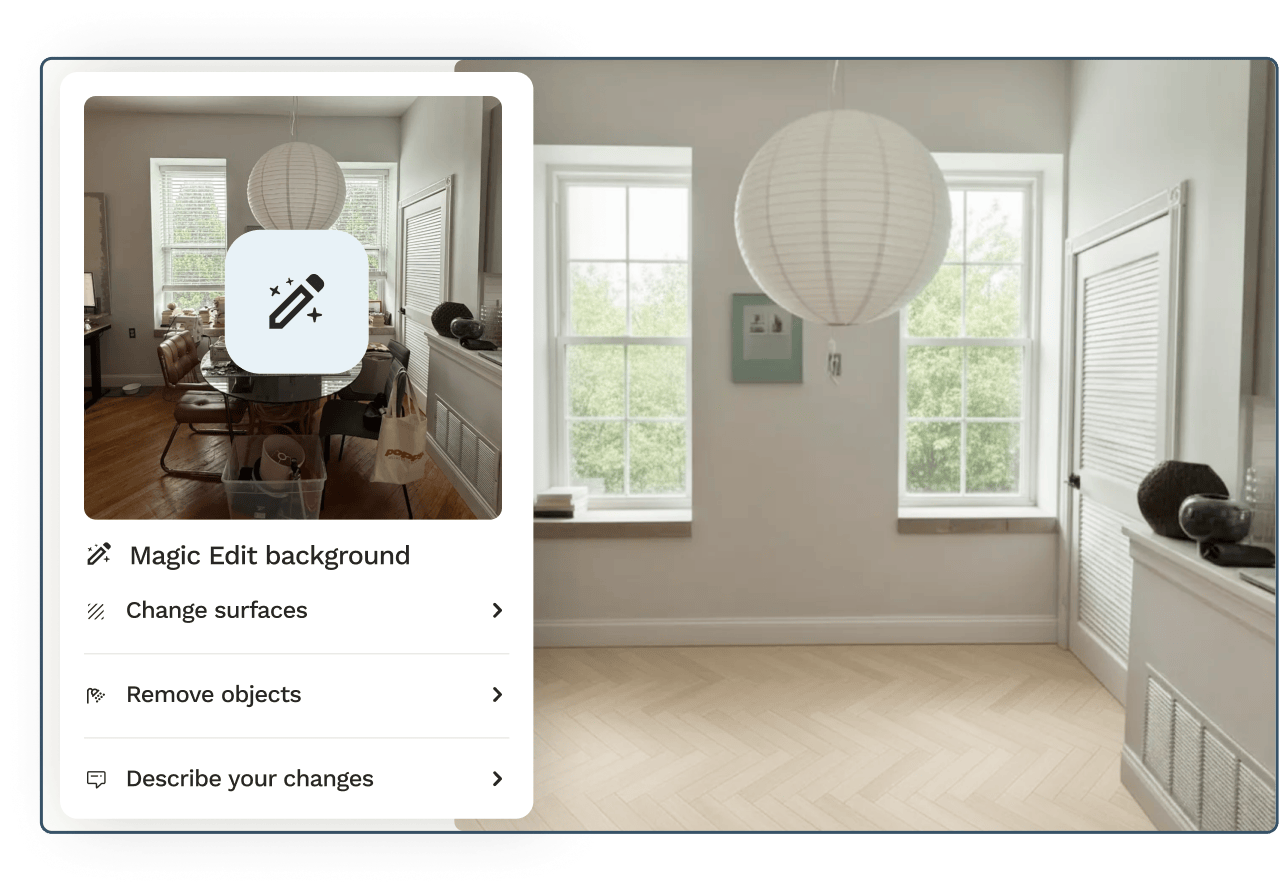
Magic Background Edit is our new tool that lets you transform the background of a room photo directly inside Spoak—so you can design with your actual space, not just an approximation. Upload a photo of your room, clear out existing furniture and clutter, and try on new finishes like wall color or flooring, all without leaving your Vizi.


Magic Background Edit is built for those moments when you want your design to feel less “inspired by” your home and more identical to it. With just a few clicks, you can:
Under the hood, there’s a lot of smart tech doing the hard work. On the surface, it stays simple: you’re still just uploading a photo, clicking a button, and refining the results with a few quick prompts until your space looks the way you want.
We’ve heard from so many of you that the dream workflow is: take a picture of your space, clear out what’s there now, and rebuild it inside Spoak with the pieces and finishes you’re considering—then generate a realistic rendering when you’re happy with it. Magic Background Edit is a big step toward making that flow feel natural, fast, and fun.
Instead of working around whatever happens to be in the photo (or trying to mentally edit out that bulky sectional you’re over), you can treat your room image like a clean stage. The architecture, windows, and lighting stay; the stuff you’re changing can vanish with a click. From there, you can layer in new furniture, swap paint colors, and experiment with flooring, all while staying in the same straightforward interface.
For everyday decorators and pros alike, the goal is the same: a clearer picture of whether an idea will actually work in your real space—without needing to learn complicated 3D tools.
You can find full step-by-step instructions here in our Help Hub, but here’s the high-level flow:
Need a place to start? Here are a few ways to put Magic Background Edit to work on day one:
Because everything happens directly on your room photo, there’s less imagination gap and more “Oh, I see it now.”

If you’ve ever snapped a quick photo of your living room and thought, “This would look so good... if I could just get my current sofa / pile of shoes / random cat tree out of the way,” this one’s for you.
Magic Background Edit is our new tool that lets you transform the background of a room photo directly inside Spoak—so you can design with your actual space, not just an approximation. Upload a photo of your room, clear out existing furniture and clutter, and try on new finishes like wall color or flooring, all without leaving your Vizi.
Magic Background Edit is built for those moments when you want your design to feel less “inspired by” your home and more identical to it. With just a few clicks, you can:
Under the hood, there’s a lot of smart tech doing the hard work. On the surface, it stays simple: you’re still just uploading a photo, clicking a button, and refining the results with a few quick prompts until your space looks the way you want.
We’ve heard from so many of you that the dream workflow is: take a picture of your space, clear out what’s there now, and rebuild it inside Spoak with the pieces and finishes you’re considering—then generate a realistic rendering when you’re happy with it. Magic Background Edit is a big step toward making that flow feel natural, fast, and fun.
Instead of working around whatever happens to be in the photo (or trying to mentally edit out that bulky sectional you’re over), you can treat your room image like a clean stage. The architecture, windows, and lighting stay; the stuff you’re changing can vanish with a click. From there, you can layer in new furniture, swap paint colors, and experiment with flooring, all while staying in the same straightforward interface.
For everyday decorators and pros alike, the goal is the same: a clearer picture of whether an idea will actually work in your real space—without needing to learn complicated 3D tools.
You can find full step-by-step instructions here in our Help Hub, but here’s the high-level flow:
Need a place to start? Here are a few ways to put Magic Background Edit to work on day one:
Because everything happens directly on your room photo, there’s less imagination gap and more “Oh, I see it now.”
We are an online interior design studio for enthusiasts and professionals. Get a real-world design education, easy-to-use tools, job opportunities, and a tight-knit community. All levels welcome.
Join now


